
Documentation
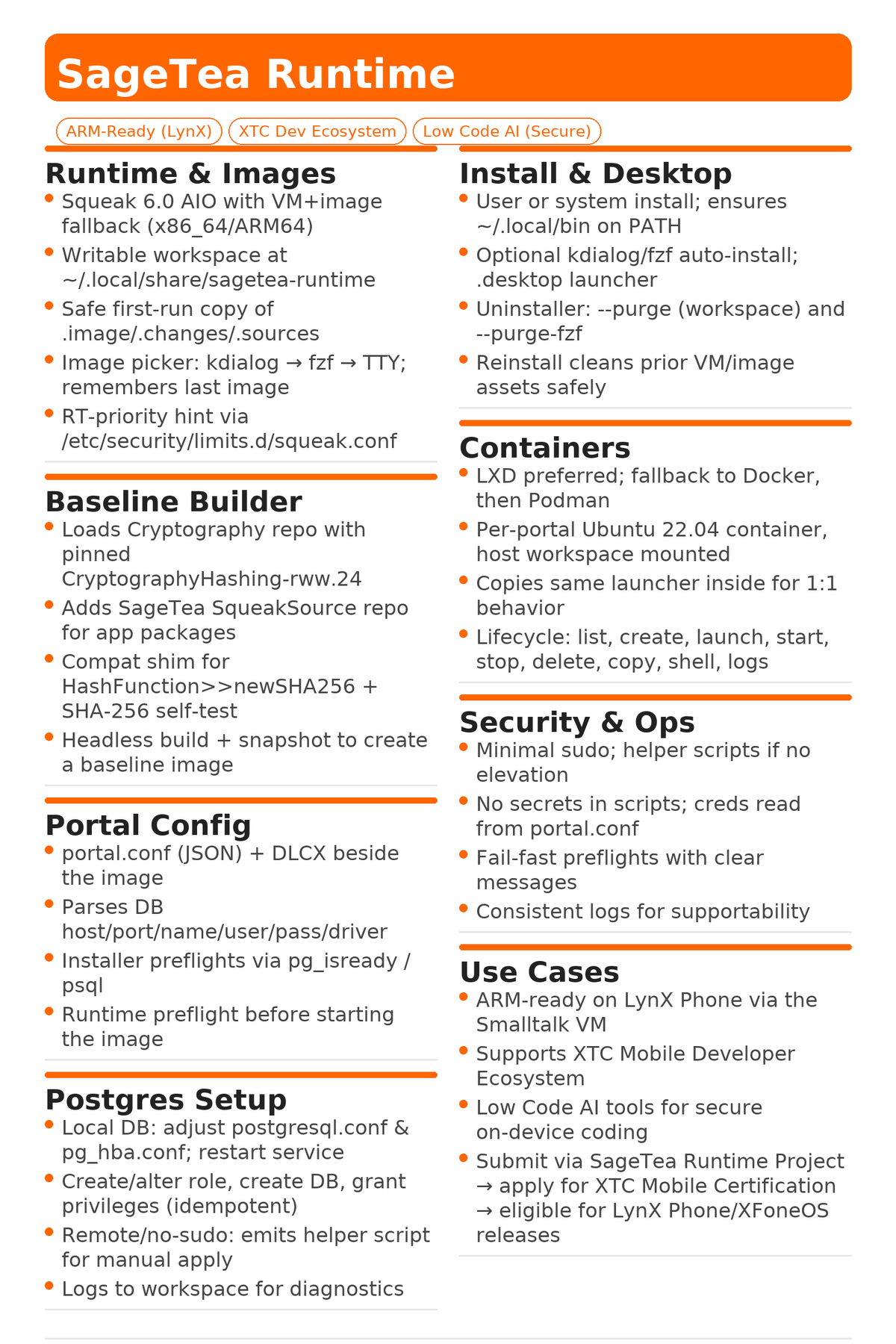
SageTea Runtime v1.13
Headless-free installer and launcher for Squeak 6 — baseline builder, Postgres auto‑config, containers (LXD/Docker/Podman), and developer‑friendly UX.
Overview
SageTea Runtime installs the Squeak 6 All‑in‑One VM, seeds a workspace with images, optionally configures a local PostgreSQL instance from a portal.conf, and provides an ergonomic sagetea-runtime launcher with an image chooser and a safe (GUI) baseline workflow.
Highlights
- Best‑effort install (add --strict to fail fast)
- GUI/TUI image chooser (kdialog / zenity / fzf / TTY)
- --baseline non‑headless baseline build
- Local Postgres auto‑config from portal.conf
- Containers: LXD preferred, Docker/Podman fallback
Paths (defaults)
- App root: ~/.local/opt/sagetea-runtime/app (user)
- Workspace: ~/.local/share/sagetea-runtime
- Launcher: ~/.local/bin/sagetea-runtime
- Log file: $WORKSPACE/install_*.log
ARM & Mobile
The Smalltalk VM runs on ARM processors, making it compatible with LynX Phone. SageTea Runtime supports the XTC Mobile Developer Ecosystem for low‑code AI development on secure mobile devices.
Requirements
- Debian/Ubuntu with apt-get
- Packages: curl jq tar unzip (auto‑installed)
- Optional UI: kdialog (KDE), zenity (GNOME), fzf (TUI)
- PostgreSQL for local DB provisioning (auto‑installed if needed)
Quick start
# User install (default paths under ~/.local)
./SageTeaRuntime.sh --user   --portal-conf ./portal.conf   --dlcx ./SageTeaInventory-2025-09-22.2.dlcx

# Launch (prompts to choose an image if multiple exist)
sagetea-runtime
Install modes & workspace
# Explicit user install with custom workspace
./SageTeaRuntime.sh --user   --workspace "$HOME/dev/sagetea-work"   --portal-conf ./portal.conf   --dlcx ./SageTeaInventory-2025-09-22.2.dlcx

# System-wide install (under /opt, launcher in /usr/local/bin)
sudo ./SageTeaRuntime.sh --system   --workspace "/var/lib/sagetea-runtime"   --portal-conf ./portal.conf   --dlcx ./SageTeaInventory-2025-09-22.2.dlcx
Reinstall / skip AIO / desktop entry
# Force re-download/extract of Squeak AIO
./SageTeaRuntime.sh --reinstall   --portal-conf ./portal.conf   --dlcx ./SageTeaInventory-2025-09-22.2.dlcx

# Skip AIO steps (useful if AIO is already present)
./SageTeaRuntime.sh --no-aio   --portal-conf ./portal.conf   --dlcx ./SageTeaInventory-2025-09-22.2.dlcx

# Don’t create a desktop launcher (.desktop)
./SageTeaRuntime.sh --no-desktop   --portal-conf ./portal.conf   --dlcx ./SageTeaInventory-2025-09-22.2.dlcx
Best‑effort vs strict
# Default is best-effort (continues on non-critical errors)
./SageTeaRuntime.sh   --portal-conf ./portal.conf   --dlcx ./SageTeaInventory-2025-09-22.2.dlcx

# Strict mode: fail fast on errors
./SageTeaRuntime.sh --strict   --portal-conf ./portal.conf   --dlcx ./SageTeaInventory-2025-09-22.2.dlcx

# Strict via env var
SAGETEA_STRICT=1 ./SageTeaRuntime.sh   --portal-conf ./portal.conf   --dlcx ./SageTeaInventory-2025-09-22.2.dlcx
Launcher usage
# Prompt to choose an image if multiple exist
sagetea-runtime

# Launch last used image (no prompt)
sagetea-runtime --use-last

# Launch a specific image
sagetea-runtime --image "$HOME/.local/share/sagetea-runtime/Squeak6.0-22104-64bit.image"

# Use a different workspace just for this run
SAGETEA_WORKSPACE="$HOME/dev/sagetea-work" sagetea-runtime
Baseline build (non‑headless; safe)
# Use chooser to pick image, then run default baseline script from workspace:
#   $WORKSPACE/SageTeaBaselineBuildScript.st
sagetea-runtime --baseline

# Use the last launched image (no chooser), default baseline script:
sagetea-runtime --use-last --baseline

# Pick image via chooser and run a specific script path:
sagetea-runtime --baseline   --baseline-script "$HOME/.local/share/sagetea-runtime/SageTeaBaselineBuildScript.st"

# Run baseline against explicit image + explicit script:
sagetea-runtime --image "$HOME/.local/share/sagetea-runtime/Squeak6.0-22104-64bit.image"   --baseline   --baseline-script "$HOME/.local/share/sagetea-runtime/SageTeaBaselineBuildScript.st"
PostgreSQL auto‑config from portal.conf
On install, the script reads portal.conf and:
- If databaseServer is localhost or 127.0.0.1, installs/configures local PostgreSQL:
CREATE ROLE "USER" LOGIN PASSWORD '****';
CREATE DATABASE "DB" OWNER "USER";
GRANT ALL PRIVILEGES ON DATABASE "DB" TO "USER";- If it’s a remote server, a helper SQL file is written to $WORKSPACE/postgres_helper.sql.
Containers (LXD/Docker/Podman)
# List containers (LXD preferred; falls back to Docker, then Podman)
./SageTeaRuntime.sh --container list

# Create a container and mount workspace at /work
./SageTeaRuntime.sh --container create px7

# Launch (create if missing, then start)
./SageTeaRuntime.sh --container launch px7

# Start / Stop / Shell / Logs
./SageTeaRuntime.sh --container start  px7
./SageTeaRuntime.sh --container stop   px7
./SageTeaRuntime.sh --container shell  px7
./SageTeaRuntime.sh --container logs   px7

# Copy (clone)
./SageTeaRuntime.sh --container copy px7 px7-clone

# Delete (force)
./SageTeaRuntime.sh --container delete px7 --force

# Force a specific engine:

# LXD
./SageTeaRuntime.sh --engine lxd --container create px7

# Docker
./SageTeaRuntime.sh --engine docker --container create px7

# Podman
./SageTeaRuntime.sh --engine podman --container create px7
Full end‑to‑end examples
# User install, set workspace, copy ./portal.conf and DLCX
./SageTeaRuntime.sh --user   --workspace "$HOME/.local/share/sagetea-runtime"   --portal-conf ./portal.conf   --dlcx ./SageTeaInventory-2025-09-22.2.dlcx

# Launch and choose an image to run
sagetea-runtime

# Baseline that image later (non-headless, safe)
sagetea-runtime --use-last --baseline

# System-wide install (any user can launch)
sudo ./SageTeaRuntime.sh --system   --workspace "/var/lib/sagetea-runtime"   --portal-conf ./portal.conf   --dlcx ./SageTeaInventory-2025-09-22.2.dlcx
sagetea-runtime
Uninstall & purge
# User install uninstall
./SageTeaRuntime.sh --uninstall

# Purge workspace too
./SageTeaRuntime.sh --uninstall --purge

# Also remove local fzf
./SageTeaRuntime.sh --uninstall --purge --purge-fzf

# System-wide uninstall (non-interactive)
sudo ./SageTeaRuntime.sh --system --uninstall --yes
Troubleshooting & tips
Heartbeat warning
sudo bash -c 'cat >/etc/security/limits.d/squeak.conf <PATH (user mode)
export PATH="$HOME/.local/bin:$PATH"Remote DB
Use the generated postgres_helper.sql on your DB host with a superuser.
© 2025 SageTea. SageTea Runtime supports the XTC Mobile Developer Ecosystem, enabling low‑code AI development for secure mobile deployments.